Test your authenticator app
Published 23 October 2026. Takes about a minute.
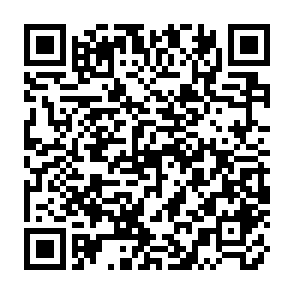
Add one published test secret to your authenticator, then check that the code it shows matches the code below. Both sides compute from the same secret, so when the six digits agree your app, your clock and your setup are all correct. When they disagree, it is one of three things, and this page says which.
The code right now
demo@keynesta.com ••• •••
Computed in this tab with WebCrypto. Nothing is sent anywhere.
How to use it
- Scan the QR code with your authenticator, or type the secret in by hand.
- Compare its six digits with the six above. Both roll over at the same moment, every 30 seconds.
- Delete the test entry when you are done. It is a public secret, so it belongs on no real account.
If the codes do not match
- The clock. A device more than half a step out of date produces codes a service will reject. Turn on automatic date and time, then compare again — this is the cause in most cases, and the only one that fixes itself. Check your device clock measures how far out this one is, in seconds.
- Half a secret. A typo or a truncated paste still produces six plausible digits, and they are wrong every single time. Scan the image rather than typing the 32 characters.
- Different parameters. Some apps let you choose SHA-256, eight digits or a longer period. This entry uses the defaults every service issues: SHA-1, 6 digits, 30 seconds.
If the codes match here but a real account still refuses yours, the problem is not your app. 2FA code not working covers what is left.
The same secret, in text
- Secret:
KEYNESTATESTSECRETDONOTUSE234567 - Issuer:
KeyNesta test - Account:
demo@keynesta.com - Algorithm, digits, period: SHA-1, 6 digits, 30 seconds
- Whole link:
otpauth://totp/KeyNesta%20test:demo@keynesta.com?secret=KEYNESTATESTSECRETDONOTUSE234567&issuer=KeyNesta%20test
None of that is confidential. Everyone who opens this page holds the same secret and sees the same code, which is what makes it safe to publish and worthless as a second factor. TOTP vs HOTP explains how six digits come out of it.
What this page does not do
It never touches your own accounts. There is nothing to type in, no account to create, and the code above is computed in your tab from the secret printed in it — no analytics, no cookies and no third-party requests, here or anywhere else on the site. If you want the same code generation for your real accounts in a browser tab, that is the web authenticator.
Frequently asked questions
Can I use this test secret on a real account?
No. It is published on this page, so anybody can generate its codes. Use it to check that an app works, then delete the entry. Real accounts must each get their own secret from the service you are protecting.
My app shows a different code from this page. Which one is wrong?
Usually neither computation: the clock is. Both sides derive the code from the current 30-second step, so a device whose time is off lands on a different step. Set the date and time automatically and compare again. If it still differs, the secret was typed in rather than scanned, or the entry was created with a different algorithm, digit count or period.
Does this page see the codes for my own accounts?
It cannot. The page only ever holds the one test secret it prints, the code is computed by your browser, and nothing is sent anywhere — the site makes no third-party requests and sets no cookies.
Does this check 8-digit or SHA-256 codes too?
Not directly. This entry is the default SHA-1, six digits, 30 seconds, because that is what services issue. If your app reads this correctly but a non-default entry fails, the app is ignoring the parameters in that QR code rather than miscomputing the HMAC.
Try KeyNesta free. The web app needs no sign-up.
Open the web app All platforms